
Design Systems: Asset Delivery Hub
In today’s fast-paced digital landscape, the seamless delivery of brand assets isn’t just a convenience – it’s a critical component of efficient workf…

Table of contents
- The Brand Asset Bottleneck: Why Scattered Files Are Killing Your Workflow
- The frustration of version control chaos.
- Client confusion: the endless ‘where’s the latest logo?’ emails.
- The real cost of wasted time and repeated requests.
- What Exactly is a Design System (Beyond Just a Style Guide)?
- From visual elements to functional components.
- The core pillars: principles, patterns, and libraries.
- Why it’s more than just a pretty PDF.
- Unifying Your Brand: The Power of a Centralized Asset Hub
- Transforming chaos into clarity for designers.
- How a single source of truth benefits your entire team.
- Leveraging a hub for consistency across all touchpoints.
- Designing Your Design System’s Asset Delivery Strategy
- Identifying your essential brand assets (logos, colors, fonts, visuals, etc.).
- Structuring your assets for intuitive access and understanding.
- Defining clear naming conventions and file formats.
- The ‘One Link’ Handoff: Simplifying Client Deliverables
- Moving beyond email attachments and shared folders.
- Creating a professional, branded experience for clients.
- Ensuring easy access for marketing teams, developers, and partners.
- Practical Implementation: Building Your Asset Hub Today
- Key features to look for in an asset delivery platform.
- Setting up your first brand kit with BrandKity.
- Best practices for uploading and organizing your files.
- Beyond the Initial Handoff: Maintaining Brand Consistency
- Keeping your asset library updated with new versions.
- Onboarding new team members and clients with ease.
- Facilitating seamless collaboration across departments.
- The Role of Design Systems in Agency Efficiency
- Streamlining client onboarding and project kickoffs.
- Reducing internal communication overhead.
- Delivering a higher perceived value to clients.
- Common Pitfalls to Avoid When Delivering Brand Assets
- Future-Proofing Your Brand: Scalability and Accessibility
Imagine a single, organized point of access for all your brand’s visual and functional elements. This central hub ensures that every stakeholder, from designers to marketers to clients, has immediate access to the correct, up-to-date resources. It transforms potential chaos into a streamlined process, bolstering efficiency and reinforcing brand integrity.
The Brand Asset Bottleneck: Why Scattered Files Are Killing Your Workflow
The frustration of version control chaos.
The struggle with version control is a ubiquitous pain point in creative workflows. When logos, icons, and imagery exist in multiple iterations across various devices and shared drives, it’s nearly impossible to guarantee everyone is working with the most current and approved versions. This ambiguity leads to significant wasted time digging through folders, comparing file dates, and sending out countless clarifying emails. Designers might unknowingly use an outdated logo, resulting in re-work and costly revisions. The sheer mental overhead of managing these scattered assets detracts from the creative process itself, turning what should be an inspiring task into a tedious administrative burden.
A common scenario involves a designer needing a specific vector logo file. They might find three different versions: `logo_final.ai`, `logo_v2_really_final.ai`, and `logo_client_approved_this_time.ai`. Without a clear system, picking the correct one becomes a gamble. This inefficiency isn’t just an annoyance; it actively impedes the speed at which projects can be completed and handed off. For agencies aiming to streamline their brand delivery, tackling this version control chaos is paramount.
Client confusion: the endless ‘where’s the latest logo?’ emails.
Client-facing teams often bear the brunt of scattered asset management. The repetitive nature of “Where can I find the high-resolution logo?” or “Is this the correct color palette for social media?” creates a frustrating feedback loop. Each email, each search, each file transfer pulls resources away from value-added work. This constant back-and-forth not only strains client relationships but also reflects poorly on your agency’s professionalism and organization. Clients expect a seamless experience, and a disorganized asset delivery process directly undermines that expectation.
When a client asks for a specific asset, and the team has to spend minutes, or even hours, searching for it, it erodes confidence. It suggests a lack of control and a potentially unprofessional operation. For businesses that pride themselves on polished brand management, such as those focused on pro brand assets, this is an unacceptable breakdown. Addressing this direct point of client friction is key to building trust and ensuring a smooth brand handoff experience.
The real cost of wasted time and repeated requests.
The financial implications of scattered brand assets are often underestimated. The time spent searching for files, clarifying versions, and responding to repeated requests for the same assets adds up. If a team member spends just 15 minutes per day on such administrative tasks, that’s an hour a week, translating to 52 hours per year. For a team of five, this is 260 hours of lost productivity annually. These aren’t abstract figures; they represent billable hours that could be spent on client work, business development, or innovation.
Beyond direct time costs, there’s the risk of errors leading to expensive re-work. Using an incorrect asset can result in print jobs needing to be redone, digital campaigns with off-brand visuals, or even legal issues if unlicensed imagery is used. The cumulative effect of these inefficiencies can significantly impact an agency’s profitability and reputation. Effectively managing these assets is crucial for an efficient agency workflow and a healthier bottom line.
What Exactly is a Design System (Beyond Just a Style Guide)?
From visual elements to functional components.
While a style guide often focuses on the aesthetic — colors, typography, imagery — a design system encompasses a broader spectrum. It includes not just the foundational visual elements but also reusable functional components. Think of these as the building blocks of user interfaces: buttons, forms, navigation bars, cards, and more, all pre-designed, coded, and documented. These components ensure consistency not only in appearance but also in behavior and interaction across various digital products and platforms.
A comprehensive design system goes beyond static visuals by providing ready-to-use code snippets or even entire libraries of UI elements. This means designers and developers can pull from a shared repository of tested and approved components, drastically reducing development time and minimizing the likelihood of design inconsistencies creeping into the final product. It’s about creating a shared language and toolkit for building digital experiences that are both beautiful and robust.
The core pillars: principles, patterns, and libraries.
A robust design system is typically built upon three interconnected pillars. First are the design principles: the overarching guidelines and values that inform all design decisions, ensuring a cohesive brand identity and user experience. These might include principles like “Simplicity,” “Clarity,” or “Accessibility.” Second are the design patterns, which are repeatable solutions to common design problems. These are not just single elements but combinations of components used in specific contexts, like a login form pattern or a data table pattern. Finally, there are the component libraries, which house the actual visual elements and functional code snippets – the tangible assets that designers and developers directly use.
These pillars work in synergy. Principles guide the creation of patterns, and patterns are implemented through components in the libraries. This structured approach ensures that every element, from a single color swatch to a complex interactive component, is aligned with the brand’s core vision and functional requirements. This holistic view is what elevates a design system far beyond a simple style guide, making it a true foundation for product development.
Why it’s more than just a pretty PDF.
Many organizations begin with a style guide, a static document outlining brand aesthetics. While valuable, a style guide often falls short in a dynamic development environment. A design system, on the other hand, is a living, breathing entity. It’s not just a collection of rules and visuals; it’s an actionable framework that includes code snippets, interactive components, and clear usage guidelines. This makes it a practical tool for designers and developers, not just a reference document for brand managers.
Think of it as the difference between a recipe book (style guide) and a fully equipped kitchen with pre-portioned ingredients and step-by-step digital instructions (design system). The design system provides the tools and the process to consistently create. Its strength lies in its implementation and its ability to foster collaboration between design and development teams, ensuring that brand identity is maintained across all digital touchpoints. This active, functional nature is what makes it a powerful tool for maintaining brand consistency.
Unifying Your Brand: The Power of a Centralized Asset Hub
Transforming chaos into clarity for designers.
For designers, a centralized asset hub, often realized through a design system, is a game-changer. Gone are the days of frantic searches through shared drives or cluttered cloud folders. Instead, designers have a single, organized point of access for all approved logos, color palettes, typography, icons, imagery, and even pre-built UI components. This immediate access to verified assets drastically reduces friction in their workflow, allowing them to focus on creative problem-solving rather than administrative overhead. The clarity provided ensures they are always working with the most current and brand-aligned resources, preventing costly errors and rework.
This unification means designers can pull exactly what they need, when they need it, with confidence. Whether it’s a specific icon for a UI element or a high-resolution brand logo for a print collateral, everything is discoverable and readily available. This streamlined process not only boosts individual productivity but also contributes to a more cohesive and professional output across all projects. It’s a crucial step in enabling effortless asset delivery for creatives.
How a single source of truth benefits your entire team.
The impact of a centralized asset hub extends far beyond the design team. It becomes the single source of truth for marketing, product development, content creation, and even sales teams. When anyone in the organization needs a brand asset, they know exactly where to go. This eliminates the confusion and potential for misinformation that arises from multiple, unmanaged repositories. For marketing, it means consistent campaign visuals. For product teams, it ensures that all digital interfaces adhere to brand standards. For sales, it provides access to up-to-date collateral.
This shared understanding and accessibility foster better collaboration and reduce internal friction. Instead of different departments operating with their own potentially outdated versions of brand assets, everyone is aligned. This consistency strengthens the overall brand perception and ensures that every customer touchpoint, regardless of who or what created it, reflects the same brand identity. This is vital for agencies aiming to ace brand asset delivery to their own clients.
Leveraging a hub for consistency across all touchpoints.
The true power of a centralized asset hub lies in its ability to enforce brand consistency across every conceivable touchpoint. From a company’s website and mobile app to social media graphics, email newsletters, presentations, and even physical signage, the approved assets from the hub ensure a unified brand experience. This unwavering visual and tonal consistency is crucial for building brand recognition, trust, and loyalty. When users interact with a brand, they should feel a sense of familiarity and coherence, reinforcing its identity.
When a design system acts as this asset hub, it provides not just the assets but also the guidelines for their use. This ensures that even when different individuals or teams are creating content, they are doing so within established parameters. This prevents the dilution of brand identity that can occur when assets are managed ad-hoc. For businesses striving for a strong, memorable brand presence, this centralized approach to asset management is indispensable for maintaining that critical design system link to brand consistency.
Designing Your Design System’s Asset Delivery Strategy
Identifying your essential brand assets (logos, colors, fonts, visuals, etc.).
The foundational step in building an effective asset delivery strategy is to conduct a comprehensive audit of all existing brand assets. This involves cataloging everything from primary and secondary logos in various formats (SVG, PNG, EPS) to the complete color palette, including HEX, RGB, and CMYK values. Don’t forget typography – specify all approved fonts, their weights, and usage guidelines. Visual assets like photography style, illustration guidelines, and icon sets also need to be documented and categorized. This thorough inventory ensures that nothing critical is overlooked and provides a clear scope for your asset hub.
Beyond the common elements, consider other essential assets. This might include product screenshots, UI kits, templates for documents or presentations, social media graphics, and even approved brand messaging or tone-of-voice guidelines. The goal is to create an exhaustive list that covers every visual and informational asset used to represent the brand. This detailed identification is the bedrock upon which a well-organized and functional asset delivery system will be built, preventing future omissions and ensuring simple brand delivery.

Structuring your assets for intuitive access and understanding.
Once assets are identified, the next crucial step is to structure them in a way that is both logical and intuitive for users. This means organizing them into clear, hierarchical categories within your asset hub. Common structures include grouping by asset type (Logos, Typography, Colors, Icons, Imagery) or by application (Marketing, Web, Product UI, Print). The key is to anticipate how users will naturally look for and need these assets. Clear folder structures and consistent categorization are paramount to preventing confusion and ensuring quick retrieval.
Consider implementing a tagging system or metadata for enhanced searchability. For instance, a logo might be tagged with its primary usage, its file format, and its brand variation. This allows users to find assets not only by browsing but also through targeted searches. The goal is to make the process of finding the right asset as frictionless as possible, enabling users to spend less time searching and more time creating or implementing. This structured approach is fundamental to mastering brand delivery the smart way.
Defining clear naming conventions and file formats.
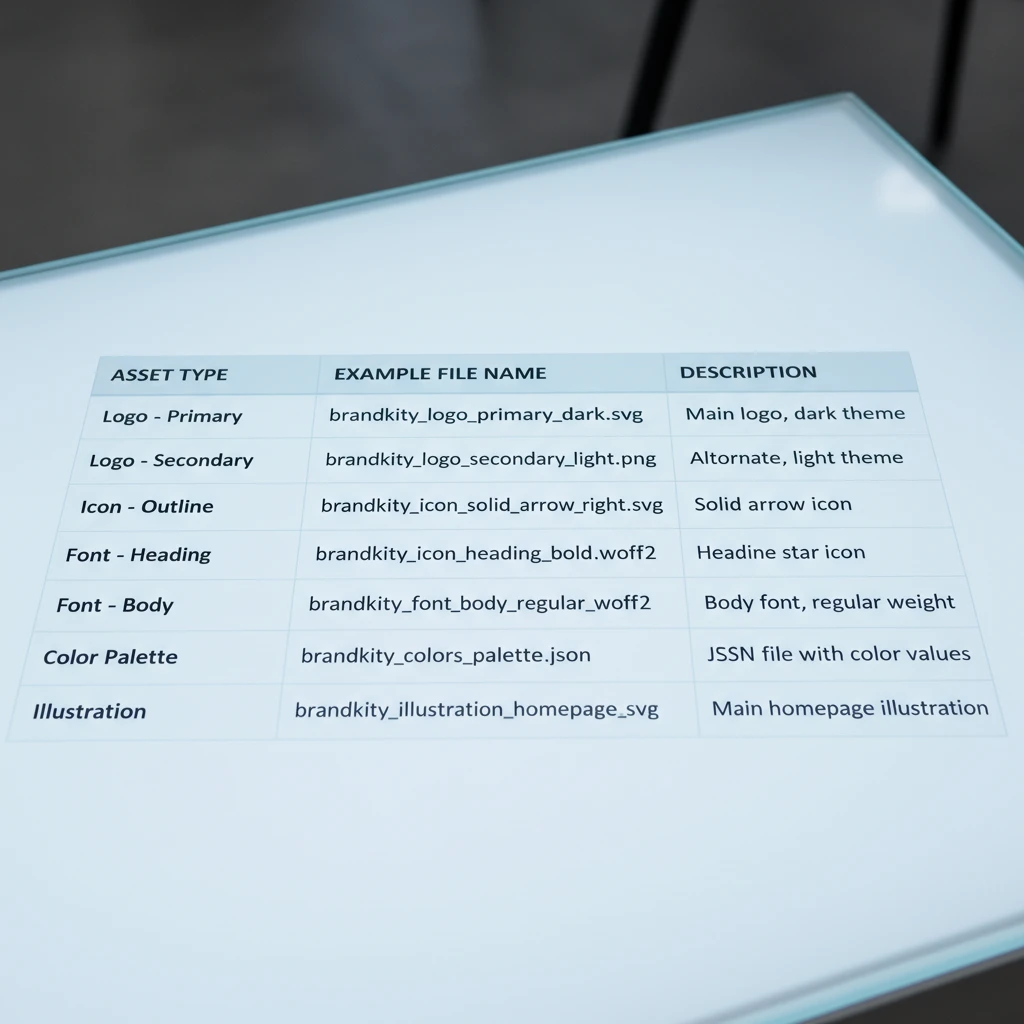
Establishing and enforcing clear naming conventions is vital for maintaining order within your asset hub. A consistent system, such as `BrandName_AssetType_Version_Format` (e.g., `BrandKity_Logo_Primary_Vector.svg`), eliminates ambiguity and makes files easily identifiable at a glance. This standardization is essential for version control and for ensuring that users can quickly locate the correct file without needing to open multiple options. It’s a small detail that has a disproportionately large impact on workflow efficiency.
Alongside naming conventions, define the required file formats for different use cases. Specify which formats are preferred for web use (e.g., SVG, PNG), print (e.g., EPS, AI, PDF), and other applications. Providing these formats ensures that assets are readily usable without requiring conversion, which can sometimes lead to quality degradation. Documenting these standards within the design system itself serves as a constant reference point, reinforcing best practices and minimizing errors, ultimately helping to slash revisions and master brand delivery.
The ‘One Link’ Handoff: Simplifying Client Deliverables
The traditional method of delivering brand assets often involves a chaotic mix of email attachments, cloud storage links, and shared folders. This fragmented approach leads to confusion, version control issues, and a frustrating experience for clients. A centralized asset delivery hub, accessible via a single, professional link, transforms this process into a streamlined, branded experience. Instead of clients sifting through disparate files, they receive a curated, organized collection that reflects the professionalism of your work. This unified approach ensures that everyone, from marketing teams to developers and external partners, has immediate access to the correct, up-to-date brand collateral.
Moving beyond email attachments and shared folders.
The era of sending bulky zip files or pointing clients to a labyrinthine Google Drive folder is rapidly becoming obsolete. These methods are prone to errors, such as sending outdated versions or missing critical assets. A dedicated asset delivery hub consolidates all necessary brand materials—logos, color palettes, typography, imagery, and templates—into a single, easily navigable location. This eliminates the guesswork for clients and ensures they are always working with the most current brand assets, significantly reducing the risk of off-brand usage. The efficiency gained by avoiding multiple follow-ups and clarifying asset versions is substantial.
Creating a professional, branded experience for clients.
Your brand asset delivery is an extension of your brand identity. A well-designed hub, often customizable with your agency’s logo and colors, presents a polished and organized front to your clients. This enhances their perception of your agency’s professionalism and attention to detail. Rather than receiving a random collection of files, clients are presented with a structured library, akin to a mini-design system for their brand. This not only makes their lives easier but also reinforces the value of the comprehensive branding work you’ve provided. It’s a tangible demonstration of your commitment to their brand’s integrity.
Ensuring easy access for marketing teams, developers, and partners.
A central asset hub serves as the definitive source of truth for all brand-related files. For marketing teams, this means quick access to approved social media graphics, ad banners, and presentation templates. Developers can reliably find correct logo versions and font files for web implementation. External partners, such as printers or advertising agencies, can download precisely what they need without requiring constant back-and-forth. This democratizes access to brand assets, empowering all stakeholders to maintain brand consistency across all touchpoints, fostering a more collaborative and efficient workflow. This structured approach is key to effective design systems implementation.
Practical Implementation: Building Your Asset Hub Today
Implementing an effective asset delivery hub doesn’t require a complete overhaul of your existing processes. The key is to select a platform that prioritizes ease of use, robust organization, and seamless sharing capabilities. Look for features that allow for clear categorization of assets, version control, and the ability to grant specific access levels if necessary. The goal is to create a single source of truth that is intuitive for both internal teams and external clients, eliminating the common pain points associated with scattered files and outdated collateral. This proactive approach to asset management can significantly improve project workflows and client satisfaction.
Key features to look for in an asset delivery platform.
When evaluating platforms for your asset hub, prioritize functionalities that directly address the challenges of brand delivery. Essential features include intuitive file organization with customizable categories and tags, allowing for quick retrieval. Robust version control is critical to ensure users always access the latest approved assets. Look for secure sharing options, the ability to create customizable brand portals with your agency’s branding, and clear usage guidelines that can be attached to assets. Integration capabilities with other tools your team uses can also be a significant advantage. The platform should also offer analytics to track asset usage and downloads.
Setting up your first brand kit with BrandKity.
Getting started with a platform like BrandKity is designed to be straightforward. Begin by creating a new brand kit and uploading your core brand assets. This typically involves uploading logo files in various formats (SVG, PNG, JPG), defining color palettes with HEX, RGB, and CMYK values, and specifying typography including font files and usage rules. You can then organize these assets into logical sections, such as “Logos,” “Color Palettes,” “Typography,” and “Imagery.” BrandKity allows you to add descriptive information for each asset, including usage do’s and don’ts, ensuring clarity for anyone accessing the kit.
Best practices for uploading and organizing your files.
To maximize the effectiveness of your asset hub, adhere to a consistent organizational structure. Always use clear, descriptive file names. For example, `logo-primary-full-color.svg` is more informative than `logo_final_v3.svg`. Group assets logically by type (e.g., logos, icons, imagery) and by application (e.g., web, print). Utilize tags to further refine searches. Regularly review and purge outdated assets to keep the library clean and efficient. Clearly define usage guidelines for each asset category, particularly for logos and typography, to prevent misuse and maintain brand integrity. This structured approach is central to organizing brand assets effectively.
Beyond the Initial Handoff: Maintaining Brand Consistency
The delivery of brand assets is not a one-time event but an ongoing process. A robust asset hub is crucial for maintaining long-term brand consistency, especially as brands evolve and new team members or clients come onboard. Keeping the asset library updated with the latest versions, new assets, and revised guidelines ensures that everyone is always working with the correct materials. This continuous maintenance prevents brand dilution and supports seamless collaboration across departments and with external partners, making it easier to scale brand efforts effectively.
Keeping your asset library updated with new versions.
As brands grow and adapt, their visual assets will inevitably change. The process of updating these assets in your delivery hub needs to be as smooth as the initial handover. When a new logo version, updated color palette, or revised set of icons is created, it should be immediately uploaded to the asset hub. Crucially, the platform should support version history, allowing users to see previous iterations if needed, but clearly marking the current, active version. This prevents confusion and ensures that everyone is referencing and utilizing the most up-to-date brand elements, preventing off-brand materials from circulating.
Onboarding new team members and clients with ease.
Bringing new individuals into the fold, whether they are new hires within your agency or new clients who will be utilizing the brand, is significantly simplified by a centralized asset hub. Instead of lengthy explanations or scattered file transfers, you can simply share the single, professional link to the brand’s asset library. This provides them with instant access to all approved brand materials and guidelines. A well-organized hub acts as a self-service resource, empowering new users to quickly understand and correctly implement the brand identity, drastically reducing the time and effort required for onboarding.
Facilitating seamless collaboration across departments.
Brand consistency is a team sport. An asset hub breaks down silos between departments like marketing, design, sales, and product development. When all teams can easily access the same, approved logos, color codes, and imagery, it eliminates the risk of conflicting brand executions. For example, a marketing team launching a new campaign can pull current campaign assets directly from the hub, ensuring they align with the latest design directives from the creative department. This unified access fosters better communication and ensures that every touchpoint of the brand narrative is coherent and aligned.
The Role of Design Systems in Agency Efficiency
Design systems are fundamental to creating scalable, consistent, and efficient branding. For agencies, a well-defined design system, underpinned by a robust asset delivery hub, translates directly into improved operational efficiency. It provides a structured framework for brand application, reducing the need for ad-hoc decisions and repetitive tasks. This allows agencies to deliver higher quality work faster, leading to increased client satisfaction and a stronger competitive edge in the market.
Streamlining client onboarding and project kickoffs.
The initial phases of client engagement are critical for setting the tone and expectations. When an agency has a clear design system and an accessible asset hub, client onboarding becomes a significantly smoother process. Instead of lengthy discovery calls about basic brand elements, clients can be directed to their dedicated brand portal. This allows them to familiarize themselves with their approved assets and guidelines at their own pace, freeing up valuable time during project kickoffs for more strategic discussions. This preemptive organization is a hallmark of efficient agency workflows.
Reducing internal communication overhead.
A common drain on agency resources is the constant back-and-forth communication regarding asset availability, correct usage, and file formats. A centralized design system, with its assets neatly organized and accessible through a single link, drastically cuts down on this internal noise. Designers don’t need to constantly field requests for logos; developers can find font specifications without interrupting the design team; and marketing can self-serve approved imagery. This reduction in communication overhead allows team members to focus on their core responsibilities, boosting overall productivity.
Delivering a higher perceived value to clients.
Clients hire agencies for their expertise and ability to deliver high-quality, consistent brand experiences. By leveraging design systems and employing a professional asset delivery hub, agencies can demonstrably enhance the perceived value of their services. Clients witness the organization, professionalism, and ease with which their brand assets are managed and delivered. This structured approach reassures them that their brand is in capable hands, leading to increased trust and a willingness to invest further in the agency’s services. It’s a clear signal that the agency operates with a high degree of professionalism and strategic foresight, aligning with the core principles of mastering brand delivery.
Common Pitfalls to Avoid When Delivering Brand Assets
The excitement of completing a branding project can quickly sour if the asset delivery process is mishandled. One of the most pervasive issues is the danger of outdated or unorganized files. Imagine a client needing a specific logo format for a new billboard, only to discover the version they have is pixelated or lacks essential variations (like favicon or grayscale). This often stems from a lack of a centralized, version-controlled system. Without a clear repository, assets can become scattered across email threads, cloud storage folders with ambiguous naming conventions, or even individual designer’s hard drives, leading to significant time loss and potential brand inconsistency. A robust system ensures that only the latest, correctly formatted, and approved assets are readily available, acting as a single source of truth for all brand elements.
Furthermore, neglecting client accessibility and usability needs is a critical pitfall. Many professionals assume that providing a ZIP file of every asset is sufficient. However, clients, especially those less digitally savvy, may struggle to navigate large archives or understand the nuances of different file types. They might not know the difference between a JPG and a PNG, or when to use a vector EPS versus a flattened GIF. Failing to provide clear instructions, organized categories, and easily downloadable formats tailored to common use cases can lead to frustration and improper asset usage. This directly impacts brand integrity and can require significant follow-up support, negating the efficiency gains of digital delivery.
There’s also a persistent myth that ‘just send everything’ is an effective strategy. This approach overwhelms recipients, making it harder for them to find what they actually need. Instead of a streamlined handover, it becomes a digital scavenger hunt. A well-organized asset hub, however, presents assets logically, often categorized by type (logos, imagery, typography) and usage (web, print, social media). This clarity is crucial for efficient onboarding and long-term brand management. A structured delivery system not only prevents confusion but also fosters trust, demonstrating a professional and considerate approach to client collaboration. For agencies looking to refine this process, exploring how to streamline their brand delivery can prevent common errors.
Future-Proofing Your Brand: Scalability and Accessibility
A design system, when implemented as an asset delivery hub, must be designed with longevity in mind. One key aspect is adapting your asset hub as your brand evolves. Brands are not static; they change logos, color palettes, typography, and visual styles over time. An effective asset hub should be flexible enough to incorporate these updates seamlessly. This means having a clear versioning system and a process for retiring old assets while introducing new ones. For example, if a brand shifts from a primarily blue color palette to one incorporating green, the hub should reflect this by updating primary color swatches and providing guidance on the new usage. This ensures that all stakeholders are always working with the most current brand identity, preventing the visual fragmentation that can occur with outdated materials. It’s about building a system that grows with the brand, rather than becoming a relic of past iterations.
Crucially, ensuring assets are accessible across various platforms and devices is non-negotiable in today’s multi-channel world. This means not only providing standard file formats but also considering responsive design needs. For instance, logos should be available in scalable vector formats (SVG) for web use and in optimized raster formats (like PNG with transparency) for specific applications. Typography assets should include web font kits alongside desktop installations. Images need to be optimized for web load times while retaining quality for print. A comprehensive asset hub will anticipate these diverse needs, offering a range of file types and sizes, and potentially even providing guidelines for their application on different screens and media. This foresight significantly reduces the likelihood of assets appearing distorted or failing to load correctly, impacting user experience.
Ultimately, the long-term benefits of a well-managed design system extend far beyond simple asset delivery. It becomes a foundational element for brand consistency, efficiency, and scalability. By centralizing assets and establishing clear guidelines, you reduce the need for repetitive requests and clarification, saving valuable time for both your team and your clients. This streamlined process can significantly slash revisions related to asset usage and formatting. Moreover, a consistently applied brand identity builds stronger recognition and trust with your audience. For agencies, this professional approach to asset management can be a significant differentiator, enhancing client satisfaction and fostering repeat business. A well-structured hub supports sustainable brand growth and simplifies complex workflows.
Saurabh Kumar
Founder, BrandKity
Saurabh writes about practical brand systems, faster client handoffs, and scalable workflows for designers and agencies building repeatable delivery operations.
Connect on LinkedIn




