
Design System Link: Brand Consistency
In today’s fast-paced digital landscape, maintaining a consistent brand identity across all touchpoints is paramount. A well-defined brand, consistent…

Table of contents
- The Unseen Cost of Scattered Brand Assets
- Why ‘that one folder’ isn’t cutting it anymore in 2026
- The ripple effect of inconsistent branding on client perception
- Defining Your Design System Link: More Than Just Files
- Core Components of a Unified Brand Identity
- Locking down your logo variations and usage rules
- Establishing a consistent color palette: Hex, RGB, CMYK, and beyond
- Font families: Hierarchy, weights, and licensing considerations
- Visual assets: Imagery, icons, and illustration styles
- Structuring Your Design System Link for Clarity
- The Power of the Single, Shareable Link
- Streamlining client handoff: From messy email chains to one clean URL
- Empowering teams and freelancers with instant access
- Minimizing repetitive asset requests and support queries
- Practical Steps to Building Your Design System Link
- Maintaining Brand Consistency Across All Touchpoints
- Establishing version control for brand assets
- How to guide stakeholders on proper asset usage
- Regularly auditing and updating your brand guidelines
- Leveraging Your Design System Link for Future Projects
- Onboarding new designers and agency members efficiently
- Scaling your brand identity as your client grows
- Common Pitfalls to Avoid When Organizing Brand Assets
- The ROI of a Well-Implemented Design System Link
In today’s fast-paced digital landscape, maintaining a consistent brand identity across all touchpoints is paramount. A well-defined brand, consistently applied, fosters trust, recognition, and loyalty. However, the reality for many designers and agencies is a fragmented collection of brand assets, leading to inefficiencies and diluted brand messaging. This is where a centralized “Design System Link” emerges as a critical solution.
Imagine a single point of truth for every brand element – a place where clients and collaborators can easily access everything they need, presented professionally and logically. This isn’t just about file storage; it’s about cultivating a robust brand experience that resonates with your audience and streamlines your entire workflow. Let’s explore the profound impact of scattered assets and how a unified approach can elevate your brand delivery.
The Unseen Cost of Scattered Brand Assets
The seemingly minor inconvenience of locating a specific logo file or remembering the exact shade of brand blue quickly escalates into a significant drain on resources and professional credibility. When brand assets are scattered across disparate folders, cloud drives, or even individual hard drives, it breeds inconsistency. This inconsistency is not just a visual problem; it undermines the very foundation of a strong brand. For instance, a client might use an outdated logo on a new marketing piece, or a partner might select a color that clashes with the established palette, all due to difficulty in accessing the correct, approved assets. The time spent searching for files, the potential for errors, and the need for constant clarification all contribute to wasted hours and increased project costs.
Why ‘that one folder’ isn’t cutting it anymore in 2026
In 2026, relying on a single, unorganized folder labeled “Brand Assets” or the like is simply no longer tenable for professional operations. The sheer volume of digital assets, the increasing complexity of brand guidelines, and the need for seamless collaboration demand a more sophisticated solution. The traditional approach often leads to version control nightmares, where multiple iterations of a logo or graphic exist without clear indication of which is the final, approved version. This leads to errors that can be costly and time-consuming to rectify. Furthermore, relying on manual file sharing for every request is inefficient and prone to human error, especially when dealing with multiple clients or large teams. The expectation for immediate access and clear, organized delivery has never been higher.
The ripple effect of inconsistent branding on client perception
The impact of inconsistent branding extends far beyond internal inefficiencies; it directly affects how clients and their customers perceive a brand’s professionalism and reliability. When a brand’s visual identity is not applied uniformly – think mismatched fonts on a website, logos of varying quality, or inconsistent color schemes – it creates a sense of disorganization and a lack of attention to detail. This can erode trust and convey an unprofessional image, making a brand appear less credible and established. For example, a startup consistently using a blurred or incorrectly proportioned logo might struggle to be taken seriously by potential investors or customers. This diluted brand experience can lead to missed opportunities, reduced customer engagement, and ultimately, a weakened market position. A unified brand presence, facilitated by a clear design system link, ensures that every interaction reinforces the brand’s intended message and values.
Defining Your Design System Link: More Than Just Files
A Design System Link, as provided by platforms like BrandKity, is far more than a mere repository for files. It acts as a central, accessible hub that codifies and communicates a brand’s visual identity. Think of it as the definitive, living document for a brand’s visual language. Its purpose is to ensure that everyone interacting with the brand – from internal teams and external partners to clients themselves – has access to the correct, up-to-date assets and understands how to use them appropriately. This goes beyond simply uploading logos and color codes; it involves creating a structured, intuitive experience that guides users. A well-defined link will include comprehensive guidelines, clear usage instructions, and a logical organization that makes finding and implementing brand elements effortless. It’s the cornerstone of professional brand delivery and a critical tool for maintaining brand integrity.
Core Components of a Unified Brand Identity
Establishing a robust design system link begins with meticulously defining and organizing its core components. These elements form the building blocks of a consistent brand identity and must be accessible and clearly articulated. Each component plays a vital role in ensuring that the brand’s visual language is applied uniformly across all platforms and materials. When these elements are standardized and readily available, it significantly reduces the likelihood of misuse and fosters a strong, recognizable brand presence. This unified approach is not just about aesthetics; it’s about building trust and reinforcing the brand’s message through consistent visual communication. Successfully managing these core components is fundamental to achieving brand coherence.
Locking down your logo variations and usage rules
The logo is arguably the most recognizable element of any brand, and its consistent application is non-negotiable. A comprehensive design system link must provide all necessary logo variations – including primary logos, secondary marks, iconographic versions, and reversed-out (white) versions – in all relevant file formats (e.g., SVG, PNG, JPG). Crucially, it must also include clear usage guidelines. This means specifying minimum size requirements, safe clear space around the logo, prohibited uses (like stretching, recoloring, or distorting), and approved placement contexts. For example, a guide might detail that the primary logo should always be used on a white background for maximum impact, while a simplified icon version is suitable for social media avatars. Adhering to these rules ensures that the logo maintains its integrity and impact across every application, preventing visual dilution.
Establishing a consistent color palette: Hex, RGB, CMYK, and beyond
Color is a powerful emotional trigger and a key identifier for any brand. A design system link must clearly define the brand’s primary, secondary, and accent color palettes. This includes providing the exact color values in all necessary formats: Hex codes for digital applications (web and screen), RGB values for screen displays, and CMYK values for print media. Providing these standardized values ensures that colors appear consistently whether viewed on a monitor, printed on business cards, or displayed on a billboard. For instance, if a brand’s primary blue is 0056b3 (Hex), it must translate accurately to RGB (0, 86, 179) and CMYK (94, 77, 31, 6). This attention to detail prevents “color drift” and ensures that the brand’s emotional tone is preserved across all mediums, fostering a predictable and recognizable visual experience.
Font families: Hierarchy, weights, and licensing considerations
Typography plays a critical role in conveying a brand’s personality and ensuring readability. A design system link should specify the brand’s primary and secondary font families, detailing which fonts are approved for headings, body text, captions, and other uses. This includes defining the hierarchy of fonts and the specific weights (e.g., light, regular, bold) to be used for different typographic elements to create visual structure and readability. Furthermore, it’s essential to address licensing. If custom or premium fonts are used, the link should clarify usage rights, ensuring that everyone using the brand assets is compliant and avoiding potential legal issues. For example, a guide might state that “Open Sans” is the primary font for body copy, using the “Regular” weight, and “Montserrat” for headings, with “Bold” weight. This ensures typographic harmony and legibility across all brand communications.
Visual assets: Imagery, icons, and illustration styles
Beyond logos and typography, a brand’s visual assets encompass a wide range of elements that contribute to its overall aesthetic and narrative. This includes defining the style and guidelines for photography – specifying types of imagery (e.g., candid, staged, product shots), color treatments, and emotional tone. Similarly, icon libraries must be standardized, ensuring consistent line weight, style (e.g., line art, filled), and color usage. If illustrations are part of the brand identity, clear parameters for style, complexity, and subject matter are essential. For instance, a brand might mandate the use of warm, natural lighting in photography and opt for a minimalist, flat illustration style for infographics. This section of the design system link ensures that all visual collateral reinforces the brand’s unique identity and professional presentation.

Structuring Your Design System Link for Clarity
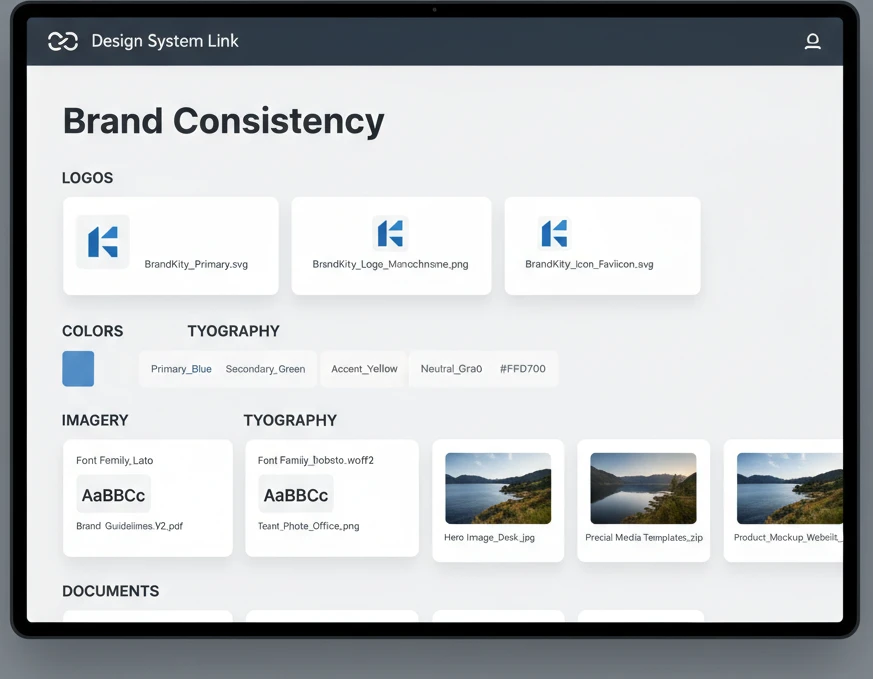
The effectiveness of a design system link hinges on its structure and usability. A well-organized link is intuitive, allowing users to find what they need quickly and efficiently, thereby reducing frustration and promoting adoption. The first principle is logical categorization. Assets should be grouped by type – for example, “Logos,” “Colors,” “Typography,” “Imagery,” “Icons,” and “Templates.” Within each category, further sub-organization might be necessary, such as separating logo variations by format (e.g., “Vector,” “Raster”) or color usage (e.g., “Full Color,” “Monochrome”). Clear naming conventions for files are also critical; descriptive names like “BrandKity_Logo_Primary_RGB.svg” are far more useful than generic labels like “logo_final_v3.ai.”
Beyond simple file organization, providing clear, concise documentation is paramount. This documentation should act as a user guide, explaining the purpose of each asset, its approved usage, and any specific constraints. This is where brand guidelines, often embedded within or linked from the design system, play a crucial role. Think about creating an intuitive navigation system within the link itself. Breadcrumbs, search functionality, and clear visual cues can guide users effectively. For example, when a user clicks on “Colors,” they should immediately see the palette with values for Hex, RGB, and CMYK, alongside brief notes on application. Platforms that offer features like version history and permission controls further enhance the structure, ensuring that users are always accessing the most current and relevant information, ultimately fostering efficient brand asset management. This structured approach is key to making your design system link a truly valuable resource, rather than just another digital folder. For agencies and designers looking to streamline these processes, exploring solutions that prioritize clarity and organization is essential, as highlighted in best practices for mastering brand asset delivery workflows.
The Power of the Single, Shareable Link
In today’s fast-paced digital landscape, the ability to centralize and disseminate brand assets efficiently is paramount. A single, shareable link acts as a universal gateway to a brand’s identity, transforming how teams, clients, and collaborators interact with essential visual and foundational elements. This consolidated approach moves away from fragmented storage solutions and endless email attachments, offering a streamlined, professional, and accessible hub. The inherent simplicity of a link belies its power, enabling instant access to everything from logo variations and color palettes to font files and brand guidelines. This not only saves time but also ensures that everyone is working with the most up-to-date and correctly formatted assets, a critical factor in maintaining brand integrity across all communications.
Streamlining client handoff: From messy email chains to one clean URL
The traditional client brand asset handoff is often a chaotic affair, characterized by overflowing inboxes, lost files, and version control nightmares. Imagine a client needing a specific logo file at 2 AM for a last-minute presentation. Without a structured system, this request can trigger a frantic search through shared drives or a series of follow-up emails. A single, well-organized design system link dramatically simplifies this critical transition. Instead of sending multiple attachments, designers can provide clients with a single URL. This link leads to a curated repository of all necessary assets, clearly categorized and ready for download. This professionalizes the handoff process, reduces client frustration, and minimizes the potential for errors arising from outdated or incorrect files. It transforms a potentially stressful event into a smooth, organized, and empowering experience, fostering greater client satisfaction and trust. This is a cornerstone of effective client collaboration.
Empowering teams and freelancers with instant access
For internal teams and external freelancers, having immediate access to approved brand assets is crucial for productivity and consistency. When a designer needs a specific color hex code, a social media team requires a banner graphic, or a copywriter needs to confirm font usage, they shouldn’t have to chase down assets. A single, shareable link, acting as a centralized brand hub, eliminates these bottlenecks. It ensures that everyone working on a project, regardless of their location or department, has unfettered access to the foundational elements of the brand. This fosters autonomy and efficiency, allowing individuals to quickly retrieve what they need without interrupting colleagues or spending valuable time searching. For agencies working with multiple clients or project teams, this becomes an indispensable tool for ensuring brand uniformity across diverse outputs.
Minimizing repetitive asset requests and support queries
The volume of repetitive questions and requests for standard brand assets can consume a significant portion of a design team’s or brand manager’s day. “Can you send me the primary logo in PNG format?” or “What’s the correct hex code for our secondary brand color?” are common queries that, when aggregated, lead to considerable lost productivity. By establishing a single, comprehensive link to your design system, you proactively address these needs. All essential files, specifications, and guidelines are readily available, empowering users to find answers and assets independently. This not only frees up valuable time for more strategic tasks but also reduces the potential for human error that can creep in during manual asset retrieval and distribution. It shifts the paradigm from reactive support to proactive self-service, creating a more efficient and less burdensome workflow for everyone involved.
Practical Steps to Building Your Design System Link
Creating an effective design system link requires a thoughtful approach to organization and accessibility. The foundational step involves inventorying all essential brand assets. This includes every variation of logos (e.g., full color, black and white, favicon), core color palettes (primary, secondary, accent), typography guidelines (font families, weights, usage rules), imagery style guides, and any other recurring visual elements like icons or patterns. Once inventoried, these assets need to be meticulously organized into logical categories. This might involve folders for “Logos,” “Color Palettes,” “Typography,” “Imagery,” and “Templates.” Each asset should be clearly named using a consistent convention, and where applicable, provided in multiple formats (e.g., SVG for logos, PNG for web graphics, AI for source files). The selection of the platform or tool used to host these assets is also critical, ensuring it supports easy navigation, search functionality, and secure sharing. A well-structured link doesn’t just contain assets; it tells a story about the brand’s identity and how it should be represented.
Beyond basic organization, consider the metadata and descriptive information that accompany each asset. For instance, a logo file should have notes indicating its approved usage, any restrictions, and the appropriate contexts for each variation. Color swatches should include hex codes, RGB, CMYK, and Pantone values. Font files should come with guidance on hierarchy and application. Implementing a robust search function within your hosting platform is also vital, allowing users to quickly find specific assets without browsing through multiple folders. Think about the decision criteria for inclusion: is this an asset that is frequently used and essential for maintaining brand integrity? For example, a campaign-specific graphic might not belong in the core design system link unless it’s meant to be a reusable template. The goal is to create a single source of truth that is both comprehensive and intuitively navigable, preventing ambiguity and promoting correct brand application. Exploring resources on design system best practices can further refine this process.
Maintaining Brand Consistency Across All Touchpoints
Brand consistency is not merely about using the same logo everywhere; it’s about ensuring a cohesive and recognizable experience for the audience across every single interaction. A well-established design system link is the bedrock of this consistency. It serves as the definitive reference point for all visual and stylistic elements, ensuring that whether a client is looking at a social media post, a website, a marketing brochure, or a presentation, the brand’s voice and appearance remain unwavering. This uniformity builds trust and recognition, making the brand more memorable and professional. Without a centralized system, different teams or individuals might inadvertently use outdated fonts, slightly different color shades, or incorrect logo versions, leading to a diluted and unprofessional brand image. The link acts as a guardian of brand integrity, enforcing a unified aesthetic.
Establishing version control for brand assets
Maintaining brand consistency hinges on the ability to manage and control different iterations of brand assets effectively. Without clear version control, teams risk using outdated logos, incorrect color codes, or superseded font files, leading to visual discrepancies and brand dilution. A robust design system link incorporates a system for tracking and managing asset versions. This means every time an asset is updated – perhaps a logo is refined or a color palette is adjusted – the new version is clearly marked and becomes the primary reference. Older versions can be archived but clearly identified as such, preventing accidental use. Decision criteria for versioning include significant changes to visual identity, corrections of technical flaws, or updates to meet new platform requirements. For example, updating a logo to a new, more minimalist design necessitates a clear version update. This ensures that everyone, from internal teams to external partners, is always accessing and using the most current and approved brand elements.
How to guide stakeholders on proper asset usage
Simply providing access to brand assets is only half the battle; guiding stakeholders on their correct application is equally crucial for maintaining consistency. Within your design system link, dedicate clear sections to brand guidelines. This documentation should go beyond just listing assets and instead provide actionable advice and examples. Include best practices for logo placement, minimum clear space, and forbidden modifications. Detail color usage hierarchies and appropriate contexts for primary, secondary, and accent colors. Explain typography rules, including when to use different font weights and sizes for headings, body text, and calls to action. Use visual examples of both correct and incorrect usage to make the guidelines easily digestible. For instance, show a correct application of the logo alongside an example of it being stretched or placed on an inappropriate background. Empowering stakeholders with this knowledge through clear, accessible documentation within the link is key to fostering a unified brand identity.
Regularly auditing and updating your brand guidelines
The landscape of design, technology, and branding is perpetually evolving, and so too must your brand guidelines. To ensure sustained brand consistency, it is imperative to conduct regular audits of your brand assets and associated guidelines. This means periodically reviewing the content of your design system link, typically on a quarterly or bi-annual basis, to identify any outdated assets, unclear instructions, or emerging needs. The decision criteria for updates might include shifts in market trends, competitor analysis, new platform requirements (like updated social media image dimensions), or feedback received from users of the system. For example, if a new series of marketing materials consistently demonstrates a need for a specific type of graphic, that could warrant an update to the imagery section. Furthermore, any changes to the brand’s strategic direction or visual identity should be immediately reflected. This proactive approach ensures your design system link remains a living, breathing document that accurately guides all brand representation.
Leveraging Your Design System Link for Future Projects
A well-constructed design system link is not just a repository for existing assets; it’s a strategic tool that can significantly impact the efficiency and success of future endeavors. By centralizing brand identity elements, it provides a readily accessible and standardized foundation upon which new projects can be built. This prevents the common pitfall of reinventing the wheel or re-establishing brand fundamentals for every new campaign or product launch. Instead, designers and strategists can instantly tap into the established visual language, ensuring continuity and accelerating the creative process. It empowers teams to focus on innovation and strategic messaging rather than spending precious time searching for or recreating core brand components. This is particularly valuable for agency workflows managing multiple client brands or internal teams launching new initiatives. The link becomes an invaluable resource for maintaining brand integrity at scale.
Onboarding new designers and agency members efficiently
The onboarding process for new designers, whether they are joining an internal team or an agency, can be time-consuming and often involves a steep learning curve regarding brand specifics. A comprehensive design system link streamlines this crucial phase. New hires can be directed to this single URL to gain immediate and in-depth understanding of the brand’s visual identity. Instead of lengthy in-person training sessions or scattered documentation, they can independently explore logos, color palettes, typography rules, and usage guidelines. This self-service approach allows them to familiarize themselves with the brand’s nuances at their own pace, significantly reducing the time it takes for them to become productive. The decision criteria for inclusion in the onboarding portion of the link should prioritize essential information needed for immediate work, such as primary logo usage and core color values. This fosters faster integration and ensures new team members are applying the brand correctly from day one, preventing early mistakes and reinforcing brand standards.
Scaling your brand identity as your client grows
As a client’s business expands, so does the complexity and scope of their brand presence. New products, services, marketing channels, and geographical markets often emerge, each requiring consistent brand application. A robust design system link acts as a scalable framework for managing this growth. It allows for the organized introduction of new brand elements without compromising the integrity of the existing identity. For instance, if a client launches a new sub-brand or a specialized service line, dedicated sections or clear categorization within the link can house these new assets and guidelines. This ensures that as the client’s needs evolve, their brand identity remains cohesive and adaptable. The decision criteria for adding new elements should always be tied to strategic business objectives and brand architecture. By providing a centralized and organized hub, the design system link facilitates the seamless expansion of a brand’s identity, supporting growth without sacrificing consistency, much like a well-managed asset delivery system.
Common Pitfalls to Avoid When Organizing Brand Assets
Organizing brand assets effectively is crucial for maintaining a consistent brand identity across all platforms. However, many teams stumble into common pitfalls that can undermine their efforts. One of the most frequent issues is the lack of a centralized and accessible repository. When assets are scattered across individual drives, cloud storage accounts, or email chains, finding the right version of a logo or a specific color palette becomes a time-consuming and frustrating ordeal. This disorganization often leads to designers using outdated or incorrect assets, resulting in brand inconsistencies that can dilute a brand’s professional image. Another significant pitfall is inconsistent naming conventions and version control. Without a clear system for naming files (e.g., `logo_primary_rgb_20260426.ai` instead of just `logo.ai`), it becomes difficult to distinguish between different iterations or formats. This ambiguity can lead to accidental use of the wrong asset, requiring costly and time-consuming rework.
Furthermore, a common oversight is failing to document usage guidelines. Simply providing the assets isn’t enough; clients and team members need to understand how to use them correctly. This includes details on spacing, clear space, color variations, and acceptable use cases. Without these guidelines, there’s a high risk of misuse, such as stretching logos, altering colors, or placing them on busy backgrounds, all of which damage brand integrity. The absence of clear ownership and update processes also contributes to disarray. When it’s unclear who is responsible for maintaining and updating the asset library, assets can become stale, and changes to the brand identity might not be reflected promptly. This can lead to a disconnect between the brand’s current identity and the assets being distributed. Finally, overlooking accessibility for different user needs can be a major hindrance. Ensuring assets are available in various formats (vector, raster, web-optimized) and are easily downloadable by all stakeholders is essential for broad adoption and consistent application.
To combat these pitfalls, teams should implement a structured approach to asset management. This begins with establishing a single source of truth for all brand assets. This could be a dedicated digital asset management (DAM) system, a shared cloud folder with strict organization, or a specialized platform designed for brand delivery. Next, develop and enforce clear naming conventions and versioning protocols. This ensures that every asset is easily identifiable and trackable. Regularly training team members and clients on these conventions is key to their adherence. Crucially, create comprehensive brand guidelines that detail the proper use of all assets. These guidelines should be visually oriented and easy to understand, covering everything from logo variations to color codes and typography. It’s also vital to assign clear ownership for maintaining the asset library and define a process for updating assets whenever the brand identity evolves. This proactive approach ensures that the asset library remains current and relevant. For agencies and designers looking to refine their client handoff process, understanding these common pitfalls can pave the way for a more streamlined and professional experience, ultimately preventing costly revisions.
The ROI of a Well-Implemented Design System Link
Investing in a well-organized and accessible design system, often delivered through a dedicated link, yields significant returns on investment (ROI) for businesses and creative teams. One of the primary financial benefits is the reduction in wasted time and resources. When designers, developers, and marketing teams can instantly access approved brand assets—logos, color palettes, typography, icons, and imagery—they spend less time searching for files or recreating them. This efficiency translates directly into faster project completion times and lower labor costs. For instance, a hypothetical mid-sized agency reported a 20% decrease in time spent on asset retrieval after implementing a centralized design system link, freeing up valuable hours for creative work and client interaction. This aligns with best practices in effortless asset delivery for creatives, ensuring that everyone has what they need, when they need it.
Beyond time savings, a robust design system link fosters unparalleled brand consistency and integrity. When all team members and external partners are working from the same set of approved, up-to-date assets, the brand’s visual identity remains cohesive across all touchpoints—websites, marketing materials, social media, and products. This consistency builds brand recognition, trust, and a professional image, which are invaluable in today’s competitive market. A consistent brand experience can lead to increased customer loyalty and higher conversion rates. According to studies, brands with strong visual consistency can see a revenue increase of up to 23%. Furthermore, a well-structured design system link simplifies onboarding for new team members and external collaborators. Instead of a confusing initial download or a chaotic series of emails, they receive a single, clear link that provides all necessary brand assets and guidelines, dramatically speeding up their integration into projects and reducing the likelihood of errors. This is a core benefit highlighted when discussing agency workflow and brand delivery, emphasizing efficiency and professionalism.
The ROI is also evident in reduced errors and rework. Inconsistent asset usage can lead to the creation of materials that don’t align with brand standards, necessitating costly and time-consuming revisions. By providing a single, definitive source of truth, a design system link minimizes these errors. Developers can reliably pull approved UI components, marketers can access correct logos for campaigns, and designers can ensure all visual elements adhere to brand guidelines. This proactive approach prevents the downstream costs associated with fixing brand misalignments. For example, a tech company might avoid thousands of dollars in potential costs by ensuring their app interface and marketing collateral always use the latest, correctly formatted brand assets. This directly contributes to streamlining client handoffs, making the entire process smoother and less error-prone for all parties involved. Ultimately, the upfront investment in creating and maintaining a design system link pays for itself many times over through increased efficiency, enhanced brand equity, and minimized operational risks, making it a strategic imperative for any organization serious about its brand.
For designers and agencies looking to professionalize their brand delivery and ensure long-term brand integrity, exploring resources on mastering brand asset delivery workflows can provide valuable insights and actionable strategies.
Saurabh Kumar
Founder, BrandKity
Saurabh writes about practical brand systems, faster client handoffs, and scalable workflows for designers and agencies building repeatable delivery operations.
Connect on LinkedIn




