
Design System Vs Style Guide
Design System Vs Style Guide: What’s the Real Difference? Hey there! Let’s chat about something that often gets a bit muddled in the branding and design world: the difference between a design system and a style guide. You might hear these terms used interchangeably, and honestly, it’s easy to see why. They both aim to
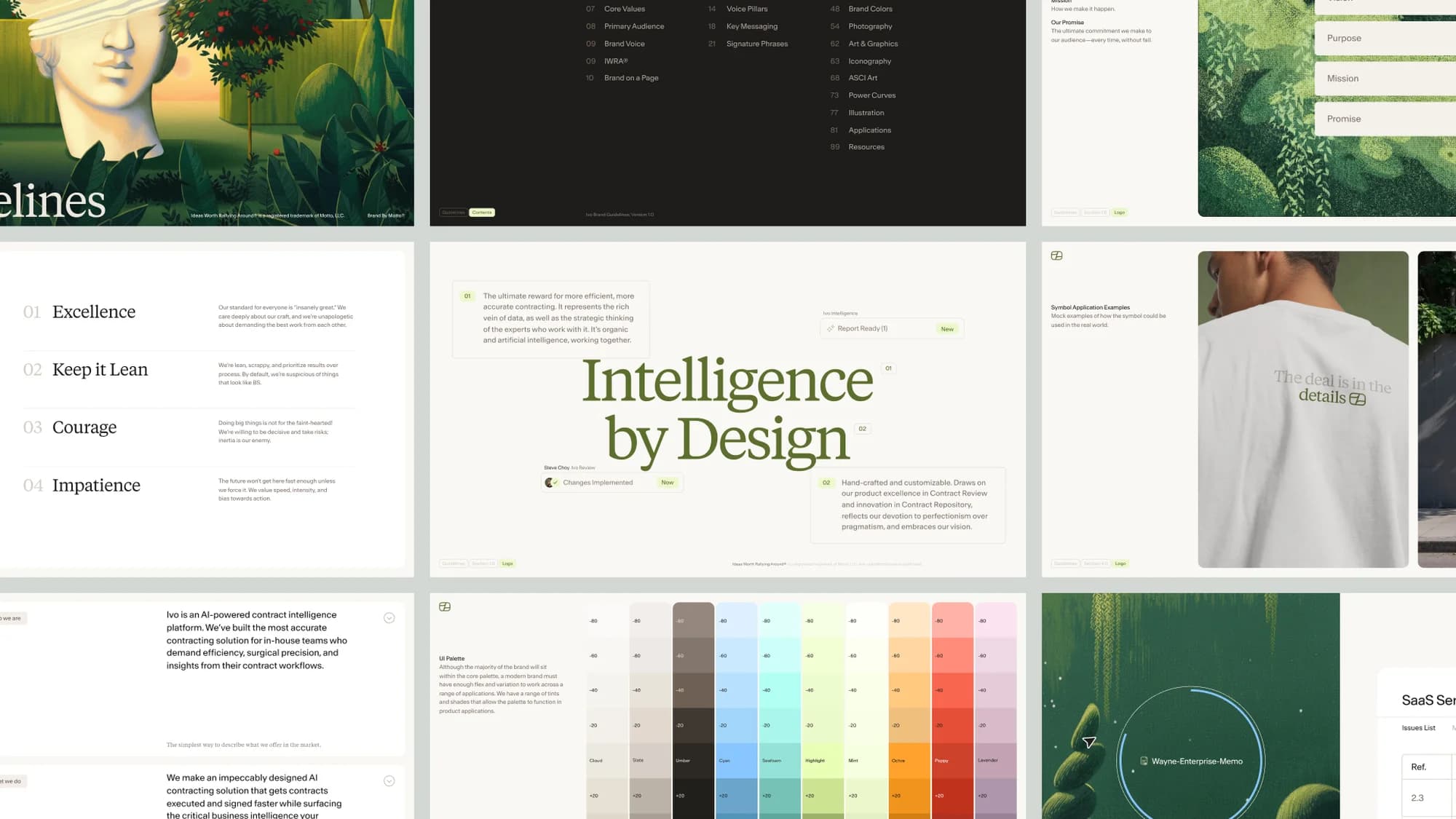
Table of contents
- Design System Vs Style Guide: What’s the Real Difference?
- What is a Style Guide? The Foundation of Brand Consistency
- What is a Design System? The Living, Breathing Ecosystem of Design
- Design System vs. Style Guide: The Key Differences
- The Overlap: Where They Meet and Support Each Other
- Why is This Distinction Important for Your Brand?
- When Do You Need One Over the Other?
- Bringing It All Together with Brandkity
- Conclusion: Embrace Clarity for a Stronger Brand
Design System Vs Style Guide: What’s the Real Difference?
Hey there! Let’s chat about something that often gets a bit muddled in the branding and design world: the difference between a design system and a style guide. You might hear these terms used interchangeably, and honestly, it’s easy to see why. They both aim to bring consistency and clarity to how a brand looks and feels. But, if you dig a little deeper, you’ll find they’re distinct entities, serving different, though often complementary, purposes. Think of it like the difference between a recipe and a fully equipped kitchen. Both are crucial for making a great meal, but one is a set of instructions, and the other is the entire environment and toolkit for creation.
At Brandkity, we’re all about helping brands shine through robust asset management and clear branding practices. Understanding these nuances is key to building a strong, cohesive brand identity that resonates with your audience and empowers your teams. So, let’s break down what a design system is, what a style guide is, and where they overlap (and diverge!).
What is a Style Guide? The Foundation of Brand Consistency
Let’s start with the style guide. In its simplest form, a style guide is a rulebook. It’s the definitive document that outlines the core elements of your brand’s visual identity. Think of it as the DNA of your brand’s look and feel.
Key Components of a Style Guide Typically Include:
- Logo Usage: Clear guidelines on how to use your logo – acceptable variations, minimum sizes, clear space requirements, and importantly, what NOT to do (stretching, recoloring, etc.).
- Color Palette: Defining primary, secondary, and accent colors, along with their specific values (HEX, RGB, CMYK, Pantone). This ensures brand colors are applied consistently across all applications.
- Typography: Specifying the brand’s fonts, including font families, weights, sizes for different uses (headings, body text, captions), and line spacing.
- Imagery and Photography: Guidelines on the style of photography or illustrations to be used, the mood, subject matter, and any technical specifications.
- Tone of Voice: While often more focused on written communication, a style guide might touch upon the brand’s voice – formal, informal, playful, authoritative, etc.
- Iconography: Standards for custom icons, including their style, size, and how they should be used.
- Brand Mission and Values: Often, a style guide will also include a brief overview of the brand’s purpose, mission, and core values to provide context for the visual elements.
Real-World Analogy: The Architectural Blueprint
Imagine you’re building a house. A style guide is like the architectural blueprint. It shows you the fundamental dimensions, the types of materials specified for walls and windows, the color scheme for the exterior paint, and the general layout. It dictates the core aesthetic and structural requirements. Anyone building or renovating parts of the house would refer to this blueprint to ensure they’re staying true to the original design intent.
Who Uses a Style Guide?
Style guides are essential for anyone creating branded materials. This includes:
- Graphic designers
- Marketing teams
- Content creators
- Web developers
- External agencies and freelancers
- Even internal teams who might be creating presentations or internal communications.
A well-maintained style guide prevents brand dilution. Without it, you’d see a chaotic mix of slightly different logos, off-brand colors, and inconsistent fonts appearing everywhere, weakening your brand’s recognition and professionalism. It’s a foundational document for ensuring that the visual identity remains intact, no matter who is executing it or where it appears.
For brands looking to formalize their visual identity, understanding the importance of investing in your brand starts with creating a comprehensive style guide. It’s not just about aesthetics; it’s about building trust and recognition.
What is a Design System? The Living, Breathing Ecosystem of Design
Now, let’s elevate the conversation to a design system. A design system is far more than just a set of rules. It’s a comprehensive, evolving library of reusable components, guidelines, and best practices that teams can use to build digital products and experiences efficiently and consistently. If a style guide is the blueprint, a design system is the entire construction site, complete with pre-fabricated building blocks, tools, and a highly skilled crew.
A design system is built upon the principles of a style guide but extends much further into the practical implementation of design and development. It’s about creating a shared language and toolkit for designers and developers alike.
Key Components of a Design System Typically Include:
- Foundations: This is where you’ll find the core elements that are also in a style guide – color palettes, typography, spacing, grid systems, and iconography. However, these are often defined with more technical detail and are directly linked to how they’ll be implemented.
- Components: This is the heart of a design system. These are reusable UI elements – buttons, forms, navigation bars, cards, modals, tables, etc. Each component has defined states (e.g., button: default, hover, active, disabled), variations (e.g., primary button, secondary button, outline button), and usage guidelines. These components are often coded and ready to be dropped into applications.
- Patterns: These are combinations of components that solve common design problems. For example, a “login form pattern” might combine input fields, labels, a button, and error messaging components.
- Guidelines and Principles: Beyond just visual rules, a design system includes principles for user experience, accessibility, content strategy, and even performance. It answers the “why” behind design decisions.
- Code: Crucially, a design system often includes the actual code (e.g., React components, CSS classes) for its UI elements. This bridges the gap between design and development, ensuring that what is designed can be built accurately and efficiently.
- Documentation: Comprehensive documentation that explains how to use each element, component, and pattern, along with the underlying principles and rationale.
- Tools and Resources: This can include design kits (e.g., Figma, Sketch libraries) that contain all the components and styles, as well as links to code repositories.
Real-World Analogy: A LEGO Master Builder’s Toolkit
Think of a design system like an advanced LEGO set for experienced builders. It doesn’t just give you red bricks and blue bricks; it gives you pre-designed modules like windows, doors, wheels, and even entire sections like a pre-built cockpit or a complete chassis. You also get instructions on how these modules fit together to create various vehicles or structures, and guidelines on how to ensure your creations are sturdy and look good. You can quickly assemble complex models by combining these pre-made, high-quality parts, knowing they will all fit and look consistent.
Who Uses a Design System?
Design systems are primarily for product teams, but their influence extends:
- UI/UX Designers
- Frontend Developers
- Product Managers
- QA Testers
- Content Strategists
- Brand Managers (to ensure system aligns with brand identity)
The goal of a design system is to accelerate development, improve consistency across digital products, and ensure a high-quality user experience. It’s about creating a scalable framework for building and maintaining digital interfaces.
Design System vs. Style Guide: The Key Differences
Now that we’ve defined each, let’s directly compare them. While there’s overlap, the core distinction lies in their scope and purpose.
1. Scope & Granularity:
- Style Guide: Focuses on brand identity elements – logo, colors, typography, imagery. It defines what the brand looks like.
- Design System: Extends beyond visual identity to include reusable UI components, patterns, code, and detailed UX guidelines. It defines how to build and create with the brand.
2. Audience & Purpose:
- Style Guide: Primarily for anyone creating branded collateral, ensuring visual consistency across marketing, print, and digital assets. Its purpose is brand recognition and integrity.
- Design System: Primarily for product teams (designers and developers) building digital interfaces. Its purpose is efficiency, scalability, and a consistent user experience across digital products.
3. Tangibility & Implementation:
- Style Guide: Often a static document (PDF, web page) that provides rules and examples.
- Design System: A dynamic, living entity that includes coded components, design assets (like UI kits), and actively used patterns. It’s designed to be used and integrated into workflows.
4. Evolution:
- Style Guide: Can be updated, but often undergoes larger revisions.
- Design System: Is designed to be iterative and continuously updated as products evolve, new patterns emerge, and technologies change. It’s a living document and toolkit.
Mini Case Study: A Tech Startup’s Journey
Imagine a rapidly growing tech startup. Initially, they create a sharp style guide to establish their brand identity for marketing materials and their initial website. This guide dictates their sleek blue logo, a modern sans-serif font, and a vibrant accent color. As they expand, building multiple web applications and mobile apps, they realize relying solely on the style guide for every screen element is becoming inefficient. Developers are constantly rebuilding common elements like buttons and form fields from scratch, leading to subtle inconsistencies and delays. This is when they recognize the need for a design system. The design system takes the style guide’s foundations (colors, typography) and builds upon it with coded components for buttons, inputs, modals, etc., making it much faster and more consistent to build their digital products.
The Overlap: Where They Meet and Support Each Other
It’s crucial to understand that a design system doesn’t replace a style guide; it usually encompasses and expands upon it. The foundational elements of your brand identity, as defined in your style guide, are the bedrock of your design system.
Think of it this way: your style guide is the “what” and “why” of your brand’s visual identity. Your design system is the “how” of applying that identity consistently and efficiently, especially within digital product development.
- Foundational Elements: The colors, typography, and logo usage rules from your style guide become the “Foundations” section of your design system.
- Brand Integrity: A design system ensures that the visual identity defined in the style guide is translated accurately into user interfaces. The coded components are built to strictly adhere to these brand rules.
- Unified Vision: Both aim for consistency, but a design system does so at a more granular, functional level for digital products.
For a company managing many different brands or sub-brands, understanding this relationship is even more critical. A robust platform can help manage both the overarching brand style guides and the specific design systems for each product or service. This is especially relevant when considering a multi-brand architecture: a holistic approach to managing multiple brands.
Why is This Distinction Important for Your Brand?
Understanding the difference between a design system and a style guide is not just academic. It has practical implications for how you manage your brand, how efficiently your teams work, and the quality of your customer experience.
1. Efficiency and Scalability:
For digital products, a design system dramatically speeds up the design and development process. Instead of reinventing the wheel for every button or input field, teams can pull from a library of pre-built, tested, and coded components. This allows you to scale your product offerings more effectively.
2. Enhanced Consistency:
While a style guide aims for visual consistency, a design system takes it a step further by ensuring functional and experiential consistency, especially across digital touchpoints. This reduces the chances of “design drift” and ensures a seamless user experience.
3. Improved Collaboration:
A design system acts as a single source of truth for designers and developers. It fosters a common language and understanding, reducing miscommunication and rework. Designers know what components are available, and developers know exactly how to implement them.
4. Accessibility and Quality:
Well-built design systems often incorporate accessibility best practices into their components from the ground up. This means accessibility isn’t an afterthought but a core part of the design and development process, leading to higher-quality, more inclusive products.
5. Future-Proofing Your Brand:
A well-structured design system, like a strong brand identity, is a key part of how to future-proof your brand. It provides a flexible framework that can adapt to new technologies and evolving user needs without requiring a complete overhaul of your entire design language.
6. Resource Optimization:
By reducing redundant design and development work, teams can focus on higher-value tasks, such as innovation and user research. This leads to better allocation of resources and can save significant time and money.
7. Brand Evolution (and Revolution):
When it’s time for a change, whether it’s a minor refresh or a full-blown rebranding process, having a design system in place can make the transition smoother. You can update foundational elements, and the system guides how these changes propagate through your digital products. A comprehensive questionnaire is often the first step in understanding what needs to change.
When Do You Need One Over the Other?
The answer isn’t always binary. It’s more about the stage of your brand and the complexity of your needs.
You absolutely need a Style Guide if:
- You are launching a new brand.
- You are undergoing a rebranding.
- You have multiple people or teams creating branded materials and need to ensure consistency.
- You work with external agencies or freelancers.
- You want to solidify your brand’s visual identity.
Essentially, any brand that produces external-facing communication needs a style guide. It’s the minimum requirement for professional brand management.
You need a Design System if:
- You have multiple digital products (websites, apps, platforms).
- You have a dedicated product development team.
- You are experiencing inconsistencies in your digital user interfaces.
- You want to accelerate your design and development cycles.
- You need to ensure a high level of accessibility and user experience across all digital touchpoints.
- You are a larger organization with multiple product teams working on similar features.
A design system is an investment, but for companies with significant digital footprints, it’s often a necessary one to maintain quality, efficiency, and brand integrity at scale.
It’s also worth noting that the scope of what a “style guide” covers can vary. Some more comprehensive style guides might include basic UI element guidelines. However, the true defining factor of a design system is its inclusion of reusable, often coded, components and a focus on the entire product development lifecycle.
Bringing It All Together with Brandkity
At Brandkity, we understand the critical role that both style guides and design systems play in modern brand management. Our platform is designed to be the central hub for all your brand assets and guidelines, whether you’re starting with a foundational style guide or building out a comprehensive design system.
We help you store, organize, and distribute your brand assets, ensuring everyone has access to the correct versions of logos, images, and other collateral. For style guides, you can centralize all your rules, making them easily accessible to your teams and stakeholders. When you move towards a design system, our capabilities can extend to managing component libraries and ensuring that your coded assets are linked back to your approved brand guidelines.
Managing brand assets effectively is crucial for avoiding common brand problems and ensuring your brand consistently communicates its value proposition. Platforms like Brandkity bridge the gap between static guidelines and dynamic creative execution, empowering your teams to create on-brand, high-quality materials efficiently.
Whether you’re focusing on the foundational elements of your brand identity or building out a sophisticated design system for your digital products, having a centralized, accessible, and well-managed approach is paramount. This is where robust brand asset management becomes not just helpful, but essential.
Conclusion: Embrace Clarity for a Stronger Brand
So, there you have it. A style guide is your brand’s visual constitution, outlining the fundamental principles of its appearance. A design system is the dynamic ecosystem and toolkit that empowers your teams to build consistent, high-quality digital experiences using those principles as its foundation. They are not mutually exclusive; rather, the design system often grows from and builds upon the style guide, providing a more actionable and scalable framework, particularly for digital products.
Understanding this distinction is your first step towards building a more cohesive, efficient, and impactful brand. Whether you’re a small startup or a large enterprise, investing in clear guidelines and robust systems will pay dividends in brand recognition, team productivity, and ultimately, customer loyalty. Don’t let your brand’s potential be diluted by inconsistency. Embrace clarity, leverage the right tools, and watch your brand thrive.
Saurabh Kumar
Founder, BrandKity
Saurabh writes about practical brand systems, faster client handoffs, and scalable workflows for designers and agencies building repeatable delivery operations.
Connect on LinkedIn




